

WhatsApp messaging service is incredibly easy to set up, but few people realize that this effortless set up also comes with a security cost.
If you are not careful, the simple set up process could leave your account open to abuse by hackers. Luckily, it is also fairly easy to enable an extra layer of protection for your account so that you will be able to retain control over your account even if your six-digit activation code gets compromised.
While your account could still be vulnerable to any serious hacker, it still offers a layer of protection should someone manage to trick you revealing your security code, through a process called ‘social hacking’.
Social hacking involves hackers managing to gain control of a friend’s Whatsapp account and then sending you a message asking you to forward a six-digit code that is being sent to your phone on their behalf. Shortly after that you receive the six-digit code that you then forward to your friend. In moments you get locked out of your WhatsApp account.
If you are wondering what happened. It is quite simple. The six-digit code that you forwarded was the six-digit code that WhatsApp sends to your mobile via SMS to associate with your account.
Since the hacker now has control over your account they are able to send messages on your behalf to others in your contact list pretending to be you and repeating the hack with everyone on your contact list. This is probably how the hacker managed to gain access to your friend’s account in the first place.
In theory, having your WhatsApp account taken over should be a fairly easy situation to resolve: just enter your phone number into the app and have it send you another six-digit code. The problem is that hackers can spam your number with a bunch of incorrect six-digit codes so that you get locked out of your account for up to 12 hours. Then, if you had not set up a PIN of your own, this leaves an attacker free to set up one of their own on your account, locking you out for seven days in total.
That is why it is so important to remember never share your six-digit WhatsApp code with anyone. No one will ever have a legitimate reason to ask for the code that WhatsApp sends you over SMS, so do not even think about sharing it. Should the worst happen, then setting up a PIN will act as another barrier to stop someone from being able to sign in to your account.
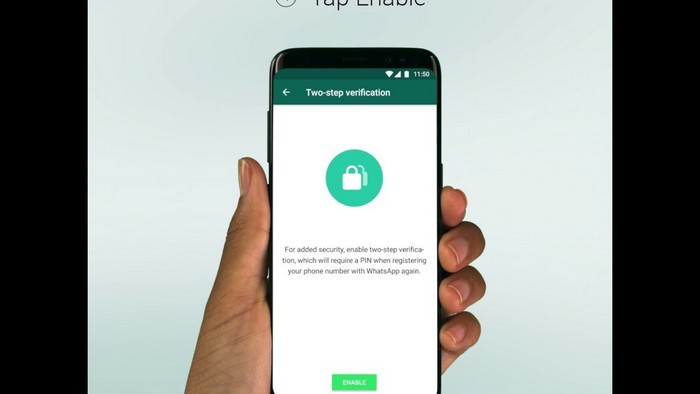
To set up your PIN open WhatsApp and tap the three dots on the top right of the screen
Click on ‘Settings’ go to ‘Account’ and then pick ‘Two-step verification’. Click ‘Enable’ and then pick your six-digit PIN. The next step is not mandatory, but adding an email address will allow you to recover your account if you forget your PIN.